
Most dead ceiling fans come down to a short list of causes: a tripped breaker, a wall switch that is off, dead remote batteries, a remote that lost its pairing, a stuck reverse switch, or a worn part inside the fan such as the capacitor. Work through them in that order, from the easiest check to the hardest, and you will usually find the problem in under 30 minutes. If you reach loose wiring, burn marks or a switch with no power, stop and call a licensed electrician.
TL;DR
- Start outside the fan: the breaker, the wall switch and the remote batteries cause most “dead fan” calls.
- If the light works but the fan does not, power is reaching the fan, so look at the pull chain, reverse switch, remote receiver and capacitor.
- Reset steps differ by model, so use your fan’s manual for re-pairing a remote.
- Turn the breaker off and confirm the wires are dead before you open anything.
- Burn marks, loose wiring or a switch with no power mean it is time for a licensed electrician.
Table of Contents
- Before you touch anything: three safety rules
- Step 1: Check the power outside the fan
- Step 2: Rule out the remote
- Step 3: The fan has power but still won’t turn
- How to tell if the capacitor or motor is bad
- How to reset a ceiling fan
- Why a fan runs but doesn’t move air
- When to stop and call an electrician
- Our perspective
- More home fixes from Fix It Daily
- FAQ
- Sources
Before you touch anything: three safety rules
A ceiling fan is wired into your house circuit, so the first rule is simple. Turning off the fan or the wall switch does not make the wires safe. Kichler’s guide says to shut off power at the breaker and use a multimeter to verify that the wires are de-energized before electrical work. Hunter likewise says to turn the fan off and switch off power at the breaker before inspecting wiring.
Three habits keep this job safe:
- Use a sturdy stepladder, placed so you never lean sideways to reach the fan.
- Switch off the breaker that feeds the fan, then test the wires with a multimeter or non-contact voltage tester. Don’t trust the wall switch.
- Let the blades stop completely before you touch the motor housing or the blades.
If you are not comfortable working with electrical parts, stop after the checks that don’t involve opening the fan. Everything in the first two sections below can be done without removing a cover.
Step 1: Check the power outside the fan
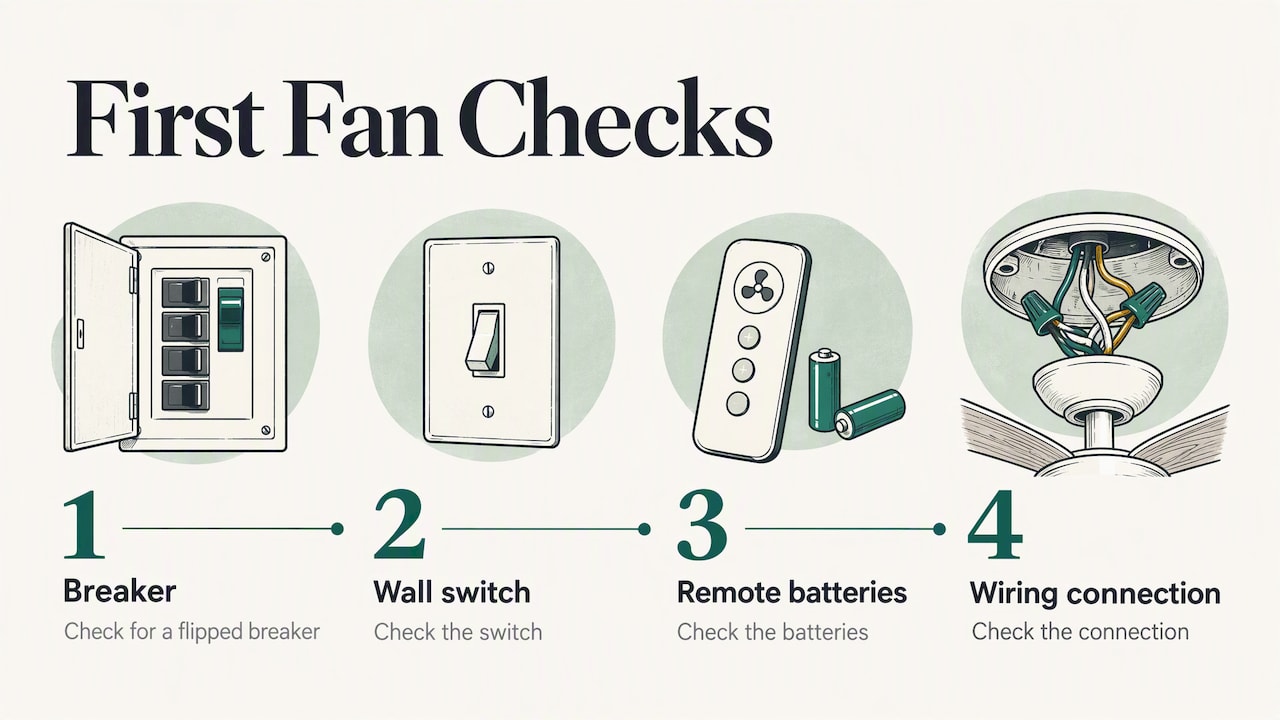
Hunter lists the breaker, the wall switch, the remote batteries and the wiring connection as the first checks for a fan that will not turn on. Do them in this order.
The wall switch
Many fans are controlled by a wall switch, sometimes one for the fan and one for the light. Flip each switch off and on. If your fan has a pull chain, set it to a running speed first, because a pull chain left in the off position will make a working wall switch look broken. Hunter’s remote manual also lists a pull chain not set to high among the causes of a fan that does not operate with its control.
If you have a dimmer in the wall box, swap it for a plain on/off switch or a fan-rated control. Airgale’s troubleshooting page says a fan needs to be compatible with an on/off wall switch, so a standard light dimmer is the wrong match for a fan motor.
The circuit breaker
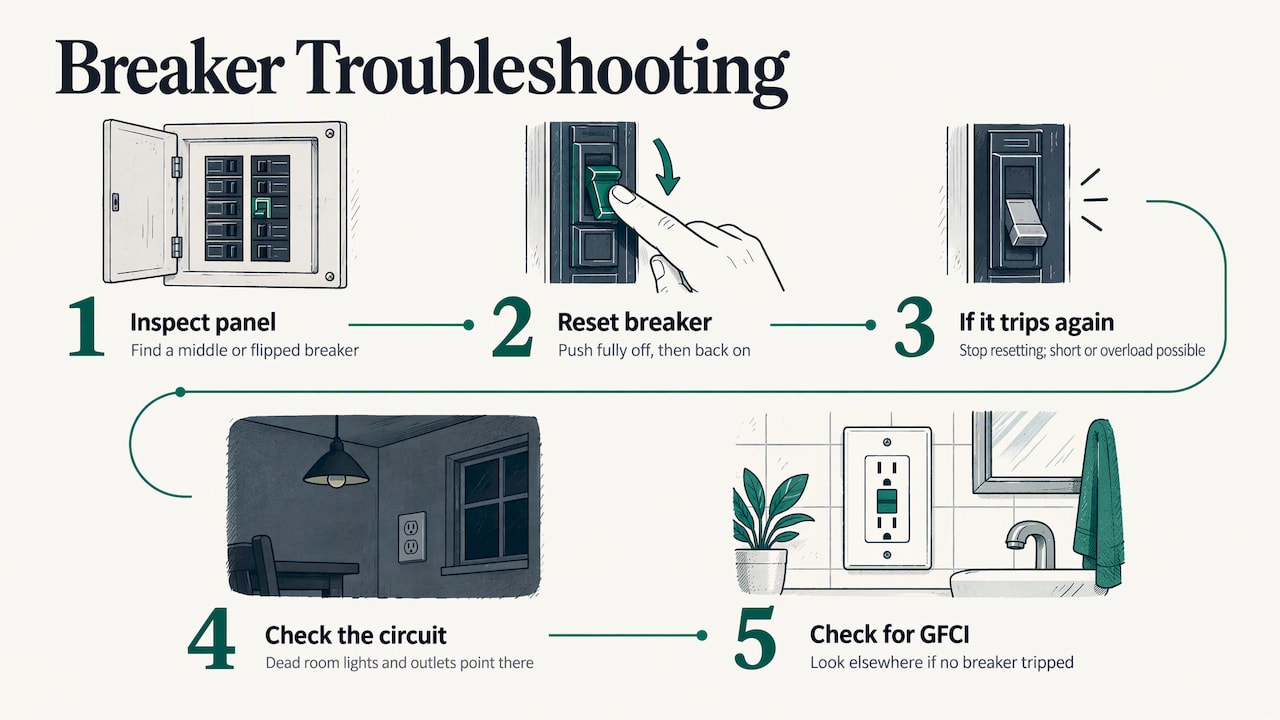
Open your electrical panel and look for a breaker that sits in the middle position or has flipped off. To reset one, push it fully to off, then back to on. If the fan runs, you are done. If the breaker trips again right away or keeps tripping over days, don’t keep resetting it. That points to a short or an overloaded circuit. Our guide on why a circuit breaker keeps tripping explains the common causes and when to bring in a pro.
Also check other things on the same circuit. If the room’s lights and outlets are dead too, the problem is the circuit, not the fan. In that case look for a tripped breaker, and if you find none, a tripped GFCI outlet elsewhere in the house, such as a bathroom or garage, can sometimes be the cause.
Does the light work?
If the fan has a light kit and the light works, you know power is reaching the fan. That rules out the breaker and the wall switch, and sends you to the fan’s own parts: the pull chain switch, the reverse switch, the remote receiver or the capacitor. If neither the fan nor the light works, go back to the breaker and wall switch.
Step 2: Rule out the remote
Remote-controlled fans add two more parts that can fail: the handheld transmitter and the receiver inside the canopy. Hunter says remote problems may involve batteries, lost pairing, the receiver, or fan power.
A quick test to separate power from remote
Big Ass Fans offers a useful way to tell the two apart for its Haiku Coastal model: if the fan lights up, beeps or spins on AC power, the fan has proper power and the next step is to verify the remote. The same idea works on many fans. Turn the breaker back on and watch and listen. A light, a beep or a twitch tells you power is arriving. Complete silence suggests a power problem upstream.
Remote fixes, in order
- Replace the batteries. Use fresh ones and check that they are seated the right way round. Kichler’s guide says to check transmitter battery installation and charge when a fan won’t start.
- Re-pair the remote. Hunter recommends re-pairing according to the operating manual. Pairing steps are model-specific, so find your manual online by searching the model number on the fan’s label.
- Match the DIP switches, if your remote has them. Older universal controls use small switches in the transmitter and receiver. Hunter’s manual says the settings must match, and power should be cycled after changing the code.
- Check the receiver. Hunter says to turn off the breaker before locating the receiver. It is usually in the canopy, the cover that sits against the ceiling. Look for a loose plug or wire. Reseat anything that has come loose, with the power off.
The same manual lists incorrect receiver wiring as a cause of no operation. If your fan has never worked with its remote since installation, wiring is a likely suspect.
Step 3: The fan has power but still won’t turn
If you’ve confirmed power and ruled out the remote, look at the fan itself. Hunter’s guidance for this case is to check that the reverse switch is fully engaged, the pull chain or control is on, the blades rotate freely, and plugs and wiring connections are secure with power off.
The reverse switch
The small slide switch on the motor housing sets the blade direction. If it sits halfway, the fan may not run at all or may run weakly. Airgale lists a reverse switch that is not centered among the things to check when only the fan fails. Push it firmly all the way to one side, then try the fan.
The pull chain
Pull the speed chain slowly and listen for each click. Four clicks is typical for a three-speed fan: three speeds and off. If the chain pulls with no click, or the fan only works on one setting, the pull chain switch inside the housing has probably worn out. Replacing it is a small job on many models, but it means opening the housing, so shut off the breaker and verify the wires are dead first.
The blades and the motor
With the power off, turn the blades gently by hand. They should spin freely and quietly. If they feel stiff or grind, the motor bearings may be worn. A fan whose blades resist a hand turn is not a good candidate for a quick repair.
Connections in the housing
Airgale notes that checks include the correct hot-wire connection and secure connections in the switch housing. Look for wire nuts that have loosened. Don’t pull on wires. If you find a wire that is brown, blackened or brittle, close the cover and call an electrician. Hunter says to stop for loose wiring or burn marks.
How to tell if the capacitor or motor is bad
The capacitor is a small component that gives the motor the push it needs to start and to hold its speed. Both Hunter and Airgale name it as a suspect when the fan has power and still misbehaves. Hunter says a fan that runs slowly or on only one speed may have a problem with its remote, wall control, reverse switch, capacitor or wiring harness. Airgale’s checklist includes looking for a capacitor that is burnt or melted.
Here is how the symptoms usually sort out:
| What you see or hear | Likely cause | What to do |
|---|---|---|
| Nothing happens, and the light is dead too | Breaker, wall switch or circuit | Check the breaker and switch |
| Light works, fan is dead | Pull chain switch, reverse switch, receiver, capacitor | Work through Step 3 |
| Fan hums but blades don’t move, or move only if pushed | Often the capacitor | Replace the capacitor or the fan (see below) |
| Fan runs on one speed only | Pull chain switch, capacitor or wiring harness | Inspect the switch, then the capacitor |
| Fan works with the pull chain but not the remote | Batteries, pairing or receiver | Step 2 |
| Burning smell, smoke or visible scorch marks | Failed part or wiring | Turn the breaker off and call an electrician |
A practical rule for motor versus capacitor
A weak capacitor tends to cause a fan that hums, starts slowly or sticks to one speed, while the motor itself can still be healthy. A failed motor tends to show as a fan that is silent, hot to the touch, or grinding when you turn the blades by hand. These are common patterns, not a guarantee. A capacitor is also a part that can hold a charge, and a motor that runs hot can be a fire risk. If you suspect either one, the safer choices are a licensed electrician or replacing the fan.
Repair or replace?
Capacitors are specific to the fan model, so the replacement must match the original’s rating. Hunter says that when a fan has power but still won’t turn, the wiring harness, capacitor, receiver or internal control may need model-specific diagnosis or replacement. If the fan is old, the motor is noisy, and the part costs a good share of a new fan, replacing the fan is often the cleaner answer. A new fan also gives you a chance to pick a model with a better remote and an easier-to-reach receiver.
How to reset a ceiling fan
People search for a reset because they expect a button. Most ceiling fans don’t have one. What people call a reset is usually one of two things:
- A power cycle. Turn the breaker off for about a minute, then back on. This clears a receiver that has frozen.
- A remote re-pair. The steps differ by brand and model. Hunter says reset and pairing procedures vary by model and tells you to use the operating or installation manual.
A typical re-pair involves cutting power, restoring it, and pressing a button on the remote within a short window. Follow your own manual for the exact timing, because the wrong sequence can leave the remote unpaired.
Why a fan runs but doesn’t move air
If the blades spin but you feel little breeze, check these:
- Direction. In summer the fan should push air down. Make sure the direction switch is fully engaged and not in neutral, as Hunter points out.
- Speed. A fan stuck on a slow speed may have a weak capacitor, a bad speed switch or a remote problem.
- Blades. Dust and loose blade screws can reduce airflow and cause wobble. Wipe the blades and snug the screws with the power off.
- Room size. A fan that is too small for the room will feel weak even when it is healthy.
When to stop and call an electrician
DIY has a clear limit here. Hunter says to call a licensed electrician if you find loose wiring or burn marks, if the switch has no power, or if you are uncomfortable working with electrical components. Add these to your own list:
- The breaker trips again as soon as you reset it.
- You smell burning or see melted plastic or scorched wire insulation.
- The wires in the ceiling box are still live after the breaker is off.
- The wall switch has no power, or the fan is wired to a circuit you can’t identify.
- The fan is heavy and the ceiling box looks unsupported. A fan needs a box rated for it.
Calling for help is not a failure. It is the point where a homeowner’s checklist ends and a licensed professional’s job begins.
Our perspective
We see the same pattern in almost every dead-fan question: people jump to the motor when the cause is a switch, a battery or a breaker. That is why we tell readers to start with the cheap, safe checks and to keep a note of what they tried. It saves money, and it makes any later call to an electrician faster.
We also think the stopping point matters as much as the fix. Our approach is plain English, a practical first step, a clear safety warning and an honest signal for when a job needs a licensed professional. Opening a fan canopy is fine when the breaker is off and the wires are verified dead. Guessing at wiring is not.
If a step in this guide feels unclear, that is a good moment to pause. A careful homeowner who knows the cause is far better off than one who has replaced three parts.
Nikki
More home fixes from Fix It Daily
A fan that won’t start is one of many small problems that look bigger than they are. At Fix It Daily we publish step-by-step guides for household repairs, plumbing, minor electrical and connectivity problems, with advice on when to call a professional. If the breaker keeps tripping, start with our circuit breaker guide. For other common jobs, browse all our guides, from a running toilet to slow Wi-Fi.

If you’re already in the repair mindset, our guides on stopping a running toilet and fixing slow Wi-Fi at home follow the same format: find the cause, try the safe fix, know when to stop.
FAQ
Why did my ceiling fan suddenly stop working?
A sudden stop most often comes from something outside the fan: a tripped breaker, a wall switch that was flipped, or dead remote batteries. If the light still works, the fan’s own switch, reverse switch, receiver or capacitor is the next suspect. Work through the checks in order before you replace anything.
Why won’t my ceiling fan turn on but the light works?
The light working shows power is reaching the fan. Check that the pull chain is set to a speed, the reverse switch is fully engaged, and the remote has fresh batteries and is paired. If all that checks out, the capacitor, receiver or internal control may need a model-specific repair or replacement.
How do I know if my ceiling fan capacitor is bad?
Signs include a fan that hums without starting, starts slowly, or runs on only one speed, plus a capacitor that looks burnt or melted on inspection. Capacitors are model-specific, so a replacement must match the original. If you aren’t comfortable opening the housing, a licensed electrician can test and replace it.
How do I reset my ceiling fan?
Turn the breaker off for about a minute and back on to clear a frozen receiver. For a remote that lost pairing, follow the re-pair steps in your fan’s manual, because they differ by model. Search the model number on the fan’s label to find the manual.
Is it safe to fix a ceiling fan myself?
The no-tools checks (breaker, wall switch, batteries, reverse switch) are safe for most homeowners. Anything inside the canopy or housing needs the breaker off and the wires confirmed dead with a tester. Stop and call a licensed electrician for burn marks, loose wiring or a switch with no power.
Sources
- How to Fix a Ceiling Fan That Won’t Turn On, Wobbles, or More (Hunter)
- Light Remote Control manual (Hunter)
- Ceiling Fan Installation Guide (Kichler Lighting)
- Haiku Coastal Fan Not Turning On (Big Ass Fans)
- Trouble Shooting (Airgale Fan Company)